Webflow Localisation: A Guide for Global Success
Reaching a global audience demands more than a translated homepage. It requires a platform that can manage localised content, metadata, layouts, and publishing workflows without forcing teams to maintain separate websites or stitch together third-party tools. Webflow localisation delivers exactly this: a native system for scaling across regions while keeping CMS, SEO foundations, and design system unified. For organisations ready to invest in website localisation, it is one of the most compelling reasons to choose Webflow over the alternatives.
What is Webflow Localisation?
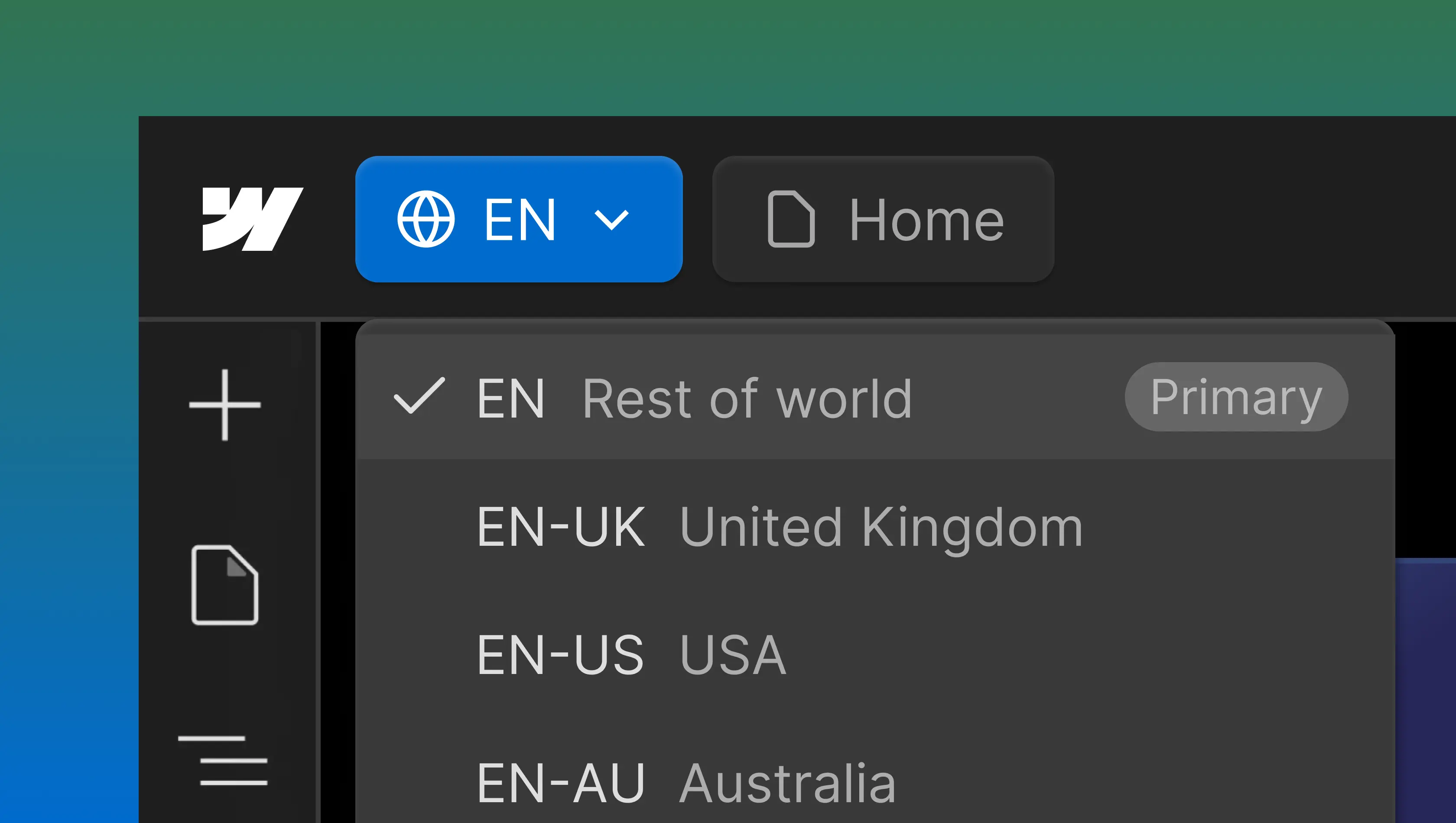
Webflow localisation is how the platform handles multiregional websites natively. Rather than depending on external plugins like Weglot, teams work within the Webflow Designer to define a primary locale, configure different locales, and build localised versions of pages, CMS content, and metadata, all under one roof.
Because Webflow's localisation features live inside the platform, translated content, layouts, SEO settings, and publishing workflows are managed from the same interface teams already use for design and development. There is no context-switching between tools, no fragile integrations to maintain. Each version of your site maps to a specific target market while sharing a single underlying structure, and as your organisation enters new markets, the system scales without the overhead of managing separate sites.
Teams working across multiple regions with different languages will find the same architecture handles a multilingual website as effectively as it does regional English variants. No additional tooling required.
One important nuance: localisation is frequently mistaken for translation alone. The real opportunity lies in adapting tone, layouts, fonts, imagery, and local context per locale. Teams that recognise this distinction early tend to see considerably stronger results.
Why Localisation Matters
Expanding internationally without rebuilding your website for every market is the practical challenge localisation solves. Rather than maintaining several disconnected sites, each with its own CMS, design drift, and SEO configuration, teams can serve localised versions from a single Webflow site. The result is less complexity, less rework, and stronger consistency across markets, all while preserving visibility across search engines and AI-powered results.
User Experience
Content that reflects local language expectations and cultural references outperforms generic alternatives consistently. Spelling conventions, terminology, date and currency formats, imagery, and video content all shape whether a visitor perceives a site as relevant or foreign. When localised content is present across both static pages and CMS-driven content, users stay longer and move toward conversion more naturally. The user experience becomes a competitive advantage rather than a barrier, particularly for businesses where international audiences represent a significant share of traffic.
SEO
Identical keywords rarely perform the same way across different regions. Search behaviour is shaped by local language patterns, competitive landscapes, and regional intent. Localised SEO enables teams to optimise metadata, target the right regional keywords, and use Webflow-generated hreflang tags alongside clean URL structures to signal relevance to search engines. Without deliberate localisation, rankings often stagnate or fragment as international traffic scales, with pages from different locales cannibalising each other in results.
AEO
AI-powered discovery through tools like ChatGPT, Claude, and Perplexity is adding a new dimension to content visibility. Answer engine optimisation accounts for the fact that queries in different languages often carry distinct intent, even when the underlying topic is the same. Structuring content specifically for each locale improves how AI surfaces answers, extending visibility beyond traditional rankings.
Conversion Optimisation
Region-specific messaging consistently converts better than one-size-fits-all copy. Calls to action, proof points, social proof, and credibility signals all carry different weight depending on the target market. Addressing international audiences effectively means more than swapping out language. It requires a platform offering genuine control over each localised site and a build designed to support meaningful regional differentiation from the start.
Webflow's Localisation Features
The platform provides an integrated set of localisation features built to handle end-to-end localisation without external plugins. Understanding what is available natively is important for any team evaluating Webflow for international projects.
Content Inheritance & Publishing
Content flows from the primary locale to every secondary locale, establishing a baseline that teams refine through targeted overrides. Copy, images, layouts, alt text, and metadata can all be customised per locale. This model means a fully polished global site can go live while regional variants are still being developed. CMS items support draft status on a per-locale basis, preventing incomplete or untranslated pages from reaching the wrong audience. Publishing controls operate independently per locale, enabling phased rollouts that match each market's readiness.
For organisations managing several English-speaking markets, this inheritance model is especially efficient. The majority of content transfers across locales with only spelling, regulatory language, terminology, and regional proof points requiring manual override.
URL Structure & SEO
International SEO depends heavily on clean URL architecture. Webflow uses a subdirectory structure that consolidates domain authority under a single root, an approach generally preferred over subdomains for long-term SEO performance. Subdomains remain available but are reserved for enterprise scenarios. The platform generates hreflang tags automatically from configured locales, building correct URL structures and communicating to search engines which regional or language version should appear for each audience. Removing this manual implementation step eliminates one of the most persistent sources of international SEO errors.
Language Detection & Switcher
Built-in automation detects visitor language settings and recommends an appropriate localised site. This works best alongside a native locale switcher, generally a dropdown positioned in the navbar or footer, giving visitors explicit control over which version they view. Switcher placement has a noticeable impact on engagement; navbar positioning tends to perform better than footer in our experience. The entire mechanism is native to the Webflow Designer, with no dependency on third-party tools.
CMS & Collection Items
Localised variants of each collection item share a single schema, avoiding the content duplication that plagues many alternative approaches. As new markets come online, additional locales slot into the existing CMS structure without requiring teams to rebuild their content architecture. For sites with substantial collections (blogs, case studies, product pages), this approach scales cleanly.
How It Works
Localisation operates as a paid add-on available on any Webflow site plan, with free preview access for teams evaluating the functionality before committing. The most consequential decision in the entire localisation process is timing: defining a localisation plan before CMS collections are designed, not retrofitting one afterwards. Getting architecture right early is what prevents the significant rework that derails projects months after launch.
Localisation Setup
Activating localisation introduces secondary locale configurations alongside the primary locale. Each one, whether representing a country, a region, or a language, produces its own version of your site at a dedicated URL path. The Webflow Designer includes a localisation-specific editing mode where teams modify individual locales without affecting the primary locale. Markets can be built out incrementally, with each locale launched when ready rather than requiring a simultaneous rollout.
Management of Translated Content
Webflow's translation tools support the addition of translated content alongside manual entry. Machine translation accelerates early-stage drafting, but leaning on it for pages that drive conversion is a common mistake. Manual translation remains the recommended approach for marketing copy, legal content, and action-oriented pages.
Beyond copy, localisation work extends to images, layouts, and fonts. Languages such as Spanish, French, Arabic, and Hebrew present specific challenges around text expansion, contraction, and reading direction. Once published, every localised site needs independent testing, and a defined localisation process should govern ongoing updates to ensure changes to shared components do not cascade into unintended consequences across localised versions.
Webflow Localisation vs Third-Party Tools
External localisation tools such as Weglot, Lokalise, and others serve a purpose, but their architecture introduces friction that accumulates. Plugins inject scripts, generate duplicate content structures, and constrain how much control teams retain over SEO and CMS behaviour. Over time, this technical debt limits what is practical to maintain.
Keeping localisation native within Webflow avoids these compounding issues. SEO settings, CMS content, layouts, and publishing workflows stay centralised in one platform. The Webflow Designer treats localisation as a first-class capability rather than an afterthought, which makes the system significantly easier to manage as the number of pages and locales grows. Before committing to a plugin-based approach, this centralised model deserves careful evaluation alongside other platform alternatives.
Webflow's enterprise plan extends localisation with custom roles and publishing workflows, giving larger organisations granular governance over editing, review, and publishing across every locale. For teams weighing standalone translation management systems, this makes Webflow a viable alternative without the overhead of a separate platform. From a pricing standpoint, fewer third-party tools in the stack also translates to lower long-term costs and reduced operational complexity.
Localisation Best Practices
Planning is the single largest determinant of localisation success. A well-considered localisation plan should be developed in parallel with information architecture, CMS design, and SEO strategy. It should be treated as a core workstream from the outset, not an addition after launch. Retrofitting is possible, but the rework involved is rarely trivial.
Market prioritisation matters more than coverage breadth. Phased rollouts allow teams to validate performance in a single market, refine workflows, and build operational confidence before expanding further. CMS draft status is the practical mechanism for this: fully localised content goes live to priority markets while other locales remain in development, invisible to visitors.
Maintaining brand consistency across locales is substantially easier when a strong global brand system is in place. Webflow's design system supports this by treating every locale as part of a unified build, rather than the fragmented approach common on platforms where each locale effectively becomes a separate site.
Finally, localisation is not a set-and-forget exercise. Rankings, SEO and AEO performance, and engagement metrics need ongoing review per locale to ensure each version of your website remains effective as the international audience evolves. For teams seeking implementation specifics, Webflow publishes a detailed step-by-step tutorial that makes an excellent companion to any localisation build.
Key Takeaways
Webflow localisation gives marketing teams a path to scale internationally without splintering the website, CMS, or design system that underpins the entire digital presence. The platform's ongoing investment in localisation, including native locale switching, automatic hreflang tag generation, per-locale CMS draft status, demonstrates a clear strategic commitment to supporting teams with international ambitions.
Localisation is not just about translation
Adapting layouts, fonts, imagery, and metadata per locale is where the real value lies. Copy is one dimension of a much broader experience that should feel native to each market.
Planning matters
CMS structure and page architecture shape how well localisation scales in practice. Teams that embed localisation into their information architecture from day one position themselves to grow without costly rework.
Native beats bolted-on
When SEO settings, publishing workflows, and CMS content live in a single platform, the operational burden stays manageable. Third-party plugins introduce complexity that compounds with every additional locale.
Control is built in
Per-locale draft status, a native locale switcher, automatic hreflang tags, and enterprise-level publishing workflows provide the tooling to deliver relevant content to each market without exposing work that is not yet ready.
Strong localised SEO, a superior user experience, and sustainable global reach are all within reach when localisation is planned properly and built on the right platform.
At Edition, we help companies build and scale Webflow sites for international markets. Our team has delivered localisation across different locales for businesses ranging from agritech to fintech, and we understand the nuances firsthand. If you are exploring Webflow for a new multi-market website, or considering adding localisation to an existing build, feel free to get in touch.
FAQs
Is localisation available on all Webflow plans?
Yes. Localisation is a paid add-on that works with any Webflow site plan. Currently there are two tiers: Localisation Essential supports up to 3 locales, while the Advanced plan covers up to 10 and adds asset localisation, localised URLs, and automatic visitor routing. Custom roles, unlimited locales, and tailored pricing are available through the enterprise plan.
Can I add localisation to an existing Webflow site?
Localisation can be activated on any live Webflow site. However, CMS architecture and page structure directly influence how well the process scales. Expect some restructuring, particularly around CMS collections and URL paths, when introducing localisation to an established build.
How does Webflow handle localised SEO?
The platform generates hreflang tags from your locale configuration automatically, manages subdirectory URL structures, and allows per-page metadata customisation for each locale. Together, these cover the technical foundations of international SEO without requiring manual implementation.
What is the difference between a primary locale and a secondary locale?
The primary locale serves as the default version of the site and the content baseline. Every secondary locale inherits from it, with the ability to override copy, images, layouts, and metadata per target market. CMS items can be set to draft status independently per locale, so only polished, fully localised content reaches each audience.
Does Webflow support right-to-left languages?
Languages such as Arabic and Hebrew are supported with RTL text rendering. For pages with complex or heavily customised layouts, additional custom CSS may be required to handle reading direction and alignment properly.
How does the Webflow locale switcher work?
A native locale switcher can be placed in either the header navigation or footer, built entirely within Webflow with no third-party dependencies. Visitors use it to move between language versions or regionalised versions of your website. For optimal results, pair the switcher with automatic language detection and, where appropriate, an IP-based redirect prompt that suggests the most relevant localised site based on browser settings and location.