Webflow Localization: A Guide for Global Success
The US market is enormous, but it is rarely enough on its own. Companies expanding into Latin America, Europe, or Asia-Pacific, and international businesses establishing a presence in the States, need a website that adapts to each target market without multiplying the operational burden. Webflow localization provides exactly this: a native system for managing translated content, metadata, layouts, and publishing workflows within a single platform. For teams evaluating why to choose Webflow, website localization is among the most persuasive capabilities available, eliminating the need for separate sites or fragile third-party tools while keeping CMS, SEO foundations, and design system intact. Any company serious about reaching a global audience should understand what this functionality makes possible.
What is Webflow Localization?
Webflow localization is the platform's built-in system for running a multiregional website. Teams use the Webflow Designer to set up a primary locale, add different locales for each market or language, and create localized versions of pages, CMS content, and metadata. No third-party tools involved.
This is a fundamentally different approach from plugins like Weglot. Webflow's localization features are embedded in the platform, which means translated content, layouts, SEO settings, and publishing workflows operate within the same environment used for design and development. As an organization scales, new locales plug into the existing system without the overhead of managing separate sites or coordinating across external tools. Every version of your site connects to a single underlying structure, customized to fit each specific target market.
The architecture works equally well for teams operating across multiple regions with different languages. A US-based company running English, Spanish, and French locales, or a European company adding a US English variant, can manage the entire multilingual website from one workspace with no additional tooling required.
Where teams tend to miss the mark is in treating localization as nothing more than a translation task. Layouts, fonts, imagery, tone, and local context all deserve attention per locale. The companies that recognize this early gain a meaningful edge.
Why Localization Matters
Localization solves a specific operational problem: expanding internationally without rebuilding your website market by market. Instead of maintaining several disconnected sites, each with its own CMS instance, design drift, and SEO blind spots, teams can serve localized versions from a single Webflow site. This reduces complexity, minimizes rework, and protects consistency across markets. It also preserves visibility across search engines and AI-powered results, which is increasingly where buyers begin their research.
User Experience
Visitors make snap judgments about relevance. Content reflecting local language expectations and cultural references earns engagement; content that feels foreign earns bounces. Spelling conventions, terminology, number and date formats, imagery, and video content all factor into whether a site feels like it was built for a specific audience or repurposed from somewhere else. When localized content appears across both static pages and CMS-driven content, the user experience improves noticeably. Users stay longer, explore more deeply, and move toward conversion with less resistance.
SEO
Search behavior differs by region in ways that are easy to underestimate. The keywords and phrases that drive organic traffic in the US do not automatically translate to performance in the UK, Germany, or Japan. Localized SEO allows teams to optimize metadata, target region-specific keywords, and communicate relevance to search engines using Webflow-generated hreflang tags and clean URL structures. Without this deliberate effort, rankings often fragment or decline as international traffic grows. Different locales end up competing for the same queries rather than reinforcing a unified domain.
AEO
More buyers are finding answers through AI-powered tools like ChatGPT, Claude, and Perplexity before they ever reach a traditional search engine. Answer engine optimization acknowledges that queries in different languages frequently carry different intent, even on the same topic. Building locale-specific content structures is how teams maintain AI visibility, a concern that goes beyond traditional rankings and is becoming increasingly central to content strategy.
Conversion Optimization
What persuades a buyer in Dallas may not land in Sao Paulo or Berlin. Region-specific messaging, localized proof points, and contextually relevant calls to action consistently outperform generic global content when speaking to international audiences. Effective conversion across markets demands more than translated copy. It requires a platform with genuine control over each localized site and a build engineered to support differentiation from day one.
Webflow's Localization Features
Webflow ships a comprehensive set of localization features designed to deliver end-to-end localization without external plugins. For teams evaluating whether the platform can support their international ambitions, these capabilities are worth examining in detail.
Content Inheritance & Publishing
The inheritance model ensures every secondary locale starts with the content already built in the primary locale. Teams then apply targeted overrides, adjusting copy, images, layouts, alt text, and metadata to fit each market. The immediate benefit is speed: a polished US site can be live and performing while a Spanish-language or European locale is still in development. CMS items accept draft status per locale, which guarantees that untranslated or incomplete pages stay hidden from the wrong audience. Publishing operates independently across locales, so teams ship localized content on each market's timeline without holding up others.
URL Structure & SEO
Strong international SEO starts with URL architecture, and Webflow implements a subdirectory approach that consolidates authority under one domain. This is broadly considered the more effective long-term strategy compared to subdomains, which Webflow reserves for enterprise use cases. Hreflang tags are generated automatically from the configured locales, creating the correct URL structure and signaling to search engines exactly which language or regional version should serve each audience. Automating this step removes what is otherwise one of the most common and damaging sources of international SEO errors.
Language Detection & Switcher
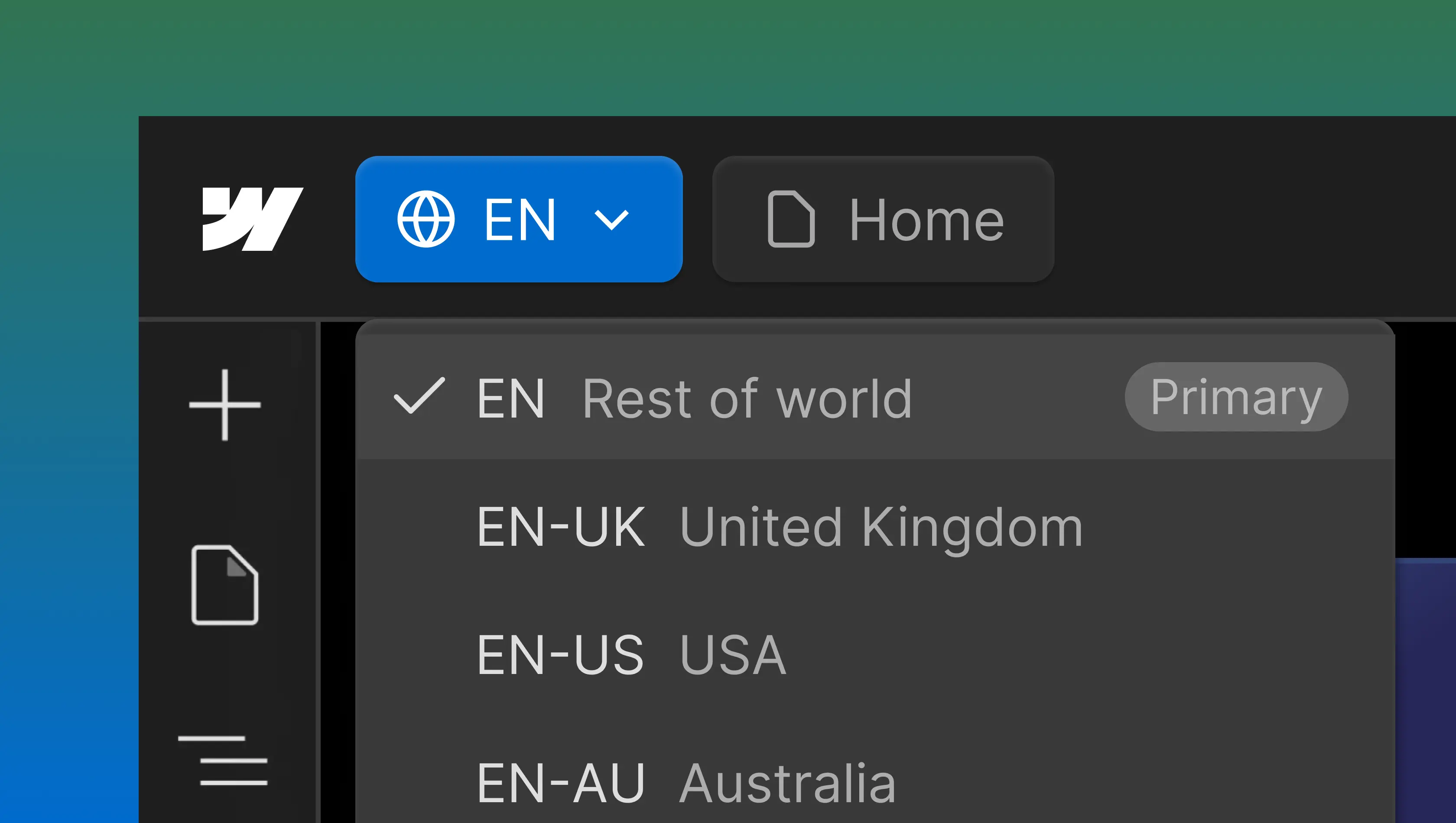
Automation within Webflow detects a visitor's language preferences and recommends the most relevant localized site. This capability pairs with a native locale switcher, typically deployed as a dropdown in the navbar or footer, that puts version control in the visitor's hands. Switcher placement is a detail that repays attention: navbar positioning consistently drives higher engagement than footer placement based on what we have seen across builds. The entire switcher mechanism is native to the Webflow Designer and carries no dependency on third-party tools.
CMS & Collection Items
Every collection item can carry localized variants while sharing one schema. This single-schema approach prevents the content duplication that creates maintenance headaches at scale. As new markets come online, each collection item simply gains a new locale variant. No need to replicate your content architecture or migrate data. For sites managing hundreds of blog posts, product pages, or resource entries, this scales without friction.
How It Works
Localization is available as a paid add-on on any Webflow site plan. Teams can preview localization functionality at no cost before committing to publish. The decision that has the greatest impact on long-term success is also the earliest one: establishing a localization plan before CMS collections are designed. Teams that skip this step routinely face significant rework when they attempt to retrofit localization onto a live site months later.
Localization Setup
Activating the feature introduces secondary locale configurations alongside the primary locale. Each locale corresponds to a region or language and generates a dedicated version of your site under its own URL path. The Webflow Designer provides a localization-specific editing mode for working on individual locales in isolation, without touching the primary locale. Markets roll out incrementally. Many US-based teams begin with a Spanish-language locale for the domestic Hispanic market, then expand to UK English, Canadian French, or other international variants.
Management of Translated Content
Translated content enters the system through manual entry or Webflow's translation tools. Machine translation offers a practical head start on initial drafts, but treating it as production-ready for conversion-critical pages is a mistake marketing teams make repeatedly. Manual translation is the recommended standard for marketing copy, legal language, and any content intended to drive a specific action.
Localization work goes well beyond words. Images, layouts, and fonts require adjustment for languages such as Spanish, French, Arabic, and Hebrew, where text expands, contracts, or changes reading direction. Every localized site should undergo independent testing after publishing, and a documented localization process should govern ongoing updates, protecting localised versions from unintended changes when shared components are modified.
Webflow Localization vs Third-Party Tools
Localization plugins such as Weglot, Lokalise, and similar platforms address a genuine need, but their architecture comes with trade-offs that intensify over time. Plugins inject scripts into the front end, produce duplicate content structures, and limit the degree of control teams retain over SEO and CMS behavior. The resulting technical debt narrows what is maintainable as a site grows in complexity.
Webflow's native approach keeps localization features inside the platform where they belong. SEO settings, CMS content, layouts, and publishing workflows stay centralized in a single system. Localization lives within the Webflow Designer as a first-class capability, not an integration bolted onto the side, which keeps the overall system easier to manage as pages and locales multiply. This centralized model warrants serious evaluation before defaulting to a plugin-based stack, especially when weighed against other platform alternatives.
The enterprise plan extends localization further with custom roles and publishing workflows, providing the governance larger organizations need over who can edit, review, and publish across each locale. For teams considering dedicated translation management systems, Webflow offers comparable control without the overhead of an additional platform. Pricing benefits follow naturally: fewer third-party tools in the stack means lower long-term costs and simpler operations.
Localization Best Practices
Every successful localization effort shares one thing in common: it started with a plan. A thorough localization plan should be built alongside information architecture, CMS design, and SEO strategy as a core workstream, not treated as a follow-up project after launch. Retrofitting is always possible, but the rework involved is rarely minor.
Prioritizing markets beats broad coverage. For US companies going global, starting with one high-value market, proving the model, and iterating before expanding to additional regions is far more effective than launching five locales at once. Draft status on CMS items is the practical mechanism: fully localized content publishes to priority markets while other locales stay in development, invisible to visitors. This phased approach lets teams validate performance, refine workflows, and scale with operational confidence.
Brand consistency is another area where planning pays off. A well-defined global brand system makes it far easier to adapt messaging for different languages while maintaining a coherent experience across every version of your site. Webflow's design system is built for this, treating all locales as part of a unified build rather than fragmenting them into separate projects.
Localization demands ongoing attention. Rankings, SEO and AEO performance, and engagement metrics all need per-locale review to ensure each version of your website continues to deliver as the international audience evolves. Webflow publishes a comprehensive step-by-step tutorial covering implementation specifics that makes an invaluable companion for teams building out their first locales.
Key Takeaways
Webflow localization gives marketing teams a credible path to international scale without fracturing the website, CMS, or design system that everything is built on. Continued platform investment in native locale switching, automatic hreflang tag generation, and per-locale CMS draft status reinforces Webflow's commitment to serving teams with international ambitions.
Localization is not just about translation
Layouts, fonts, imagery, and metadata all need locale-specific attention. Translation is one piece of a broader experience that should feel purpose-built for every market.
Planning matters
CMS structure and page architecture determine how smoothly localization scales. Embedding this into the information architecture from the beginning prevents the significant rework that catches teams who defer it.
Native beats bolted-on
Centralizing SEO settings, publishing workflows, and CMS content inside one platform keeps operational overhead in check. Third-party plugins layer on complexity that grows with each new locale.
Control is built in
Per-locale draft status, a native locale switcher, automatic hreflang tags, and enterprise-tier publishing workflows equip teams to deliver the right content to each market, with no risk of surfacing work that is not yet complete.
When localization is planned from the outset and executed on the right platform, the result is strong localized SEO, a meaningfully better user experience, and sustainable global reach.
At Edition, we work with companies across the Asia-Pacific region to build and scale Webflow sites for international markets, including the United States. Based in Auckland and Melbourne, our team brings firsthand understanding of what it takes to localize across different locales for audiences on both sides of the Pacific. If you are exploring Webflow for a new multi-market website, or considering adding localization to an existing build, feel free to get in touch.
FAQs
Is localization available on all Webflow plans?
It is. Localization works as a paid add-on on any Webflow site plan, with no tier restriction. Two options are currently available: Localization Essential covers up to 3 locales, while the Advanced plan supports up to 10 and adds asset localization, localized URLs, and automatic visitor routing. The enterprise plan offers custom roles, unlimited locales, and custom pricing.
Can I add localization to an existing Webflow site?
Yes. Localization can be turned on for any live Webflow site. That said, how well it scales depends heavily on CMS architecture and page structure. Introducing localization after launch typically involves some restructuring, especially around CMS collections and URL paths.
How does Webflow handle localized SEO?
Hreflang tags are produced automatically based on locale configuration. The platform manages subdirectory URL structures and supports per-page metadata for each locale, covering the technical requirements of international SEO without requiring manual setup.
What is the difference between a primary locale and a secondary locale?
The primary locale is the default site version that serves as the content foundation. Secondary locales inherit everything from it and allow teams to override copy, images, layouts, and metadata to match each target market. Draft status can be managed per locale, ensuring audiences only see content that is fully localized.
Does Webflow support right-to-left languages?
RTL rendering is available for languages including Arabic and Hebrew. Pages with complex or heavily customized layouts may require supplementary custom CSS to manage reading direction and text alignment correctly.
How does the Webflow locale switcher work?
Webflow includes a native locale switcher that can be positioned in the header or footer navigation. No third-party tools required. Visitors use it to switch between language versions or regionalized versions of your website. Best practice is to combine the switcher with automatic language detection and, where helpful, an IP-based redirect popup that recommends the most appropriate localized site based on browser settings and visitor location.