How to Write Meta Titles and Descriptions
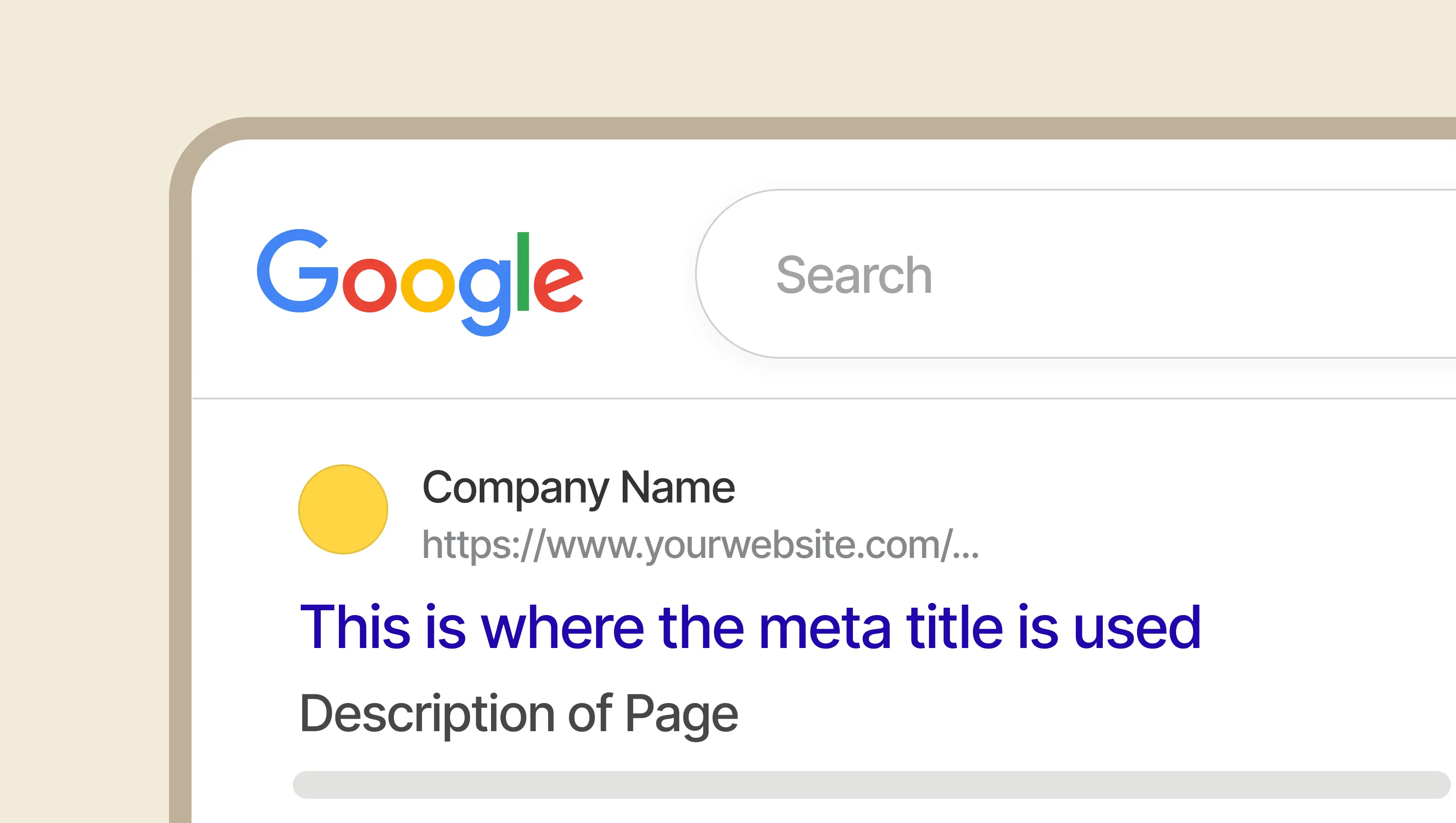
Metadata is the first impression your website makes in search. Before anyone clicks through to a page, they scan your page title and a meta description in the search engine results pages and decide whether your result is worth their attention. Get the metadata right and you earn the click. Get it wrong and the ranking you worked hard for delivers nothing.
This guide lays out how we approach writing meta titles and meta descriptions that hold up in Google search results, read well for real searchers, and reinforce the brand sitting behind them.
The Role of Meta Tags in SEO
Metadata is the bridge between your page content and the way search engines understand, rank, and display it. A meta tag is an HTML element that sits in the head of your HTML code, invisible to visitors on the page itself but highly visible wherever your site surfaces in a SERP, a browser tab, or a link preview shared on social media.
What is a meta title?
The meta title, also called the title tag or SEO title, is an HTML element declared in the head section of a web page. It is the clickable headline that appears in Google search results, the text that fills browser tabs when your page is open, and the default title used when someone shares the page on social media.
From an SEO standpoint, the title tag is one of the strongest on-page signals you can send. It tells search engines what the page is about in a few words, and it tells searchers whether this result is worth their click. Both audiences matter.
What is a meta description?
The meta description is an HTML attribute, declared inside a meta name tag in the head of the page, that summarises a web page's content in a short block of text underneath the page title in the SERP. Google has confirmed that meta descriptions are not a direct ranking factor, but that does not make them unimportant. A good meta description is a short piece of copywriting that helps you earn the click, and clicks are what turn rankings into organic traffic.
Writing meta descriptions well is a discipline of its own. The constraint is tight, the audience is skimming, and the competition sitting directly above and below your result is fighting for the same attention.
The link between click-through rate and rankings
There is a feedback loop that occurs between metadata quality and organic performance. Strong meta tags lift click-through rate, and when a page consistently earns a higher CTR than search engines expect for its position, that is a signal of relevance and a high-quality user experience. The algorithm rewards pages that searchers actually engage with, which means metadata that drives clicks tends to compound into better rankings over time.
Metadata as an extension of brand
Metadata is a brand opportunity. The tone of your meta descriptions, the way you structure your page titles, the consistency of your brand name placement across every result. All of it adds up to how your business is perceived before anyone reaches your home page. Treat your metadata like you treat the rest of your brand expression.
How to Write the Perfect Meta Title
A good meta title balances three things: what the search query is asking for, what the page actually delivers, and how the result will look when it lands in the SERP alongside nine competitors.
Character count vs. pixel width
Search engines do not measure titles by character count alone. They measure by pixel width, because different characters take up different amounts of space. As a working rule, aim for 50 to 60 characters. That keeps titles under the roughly 580 to 600 pixel threshold Google uses before a title gets truncated with an ellipsis.
Truncated titles lose their ending, which is usually where the brand name sits, so staying within the limit protects both your message and your identity in the result.
Place the primary keyword near the start
Put your target keyword as close to the beginning of the title tag as the sentence allows. Search engines weight terms nearer the start of the string more heavily, and searchers scanning a page of results process the first few words before anything else. Front-loading the primary keyword serves both.
This should never come at the cost of readability. A title that reads awkwardly because the keyword has been forced into position one will underperform a natural title that places the keyword second or third.
Use your brand name as an anchor
Ending the title with your brand name, separated by a pipe or a dash, helps builds recognition over time and gives authoritative brands an edge in competitive search queries. A simple pattern like "Primary Topic: Useful Detail | Brand Name" works for most pages. On pages where space is tight, like blog articles, the brand can be dropped, but doing so consistently across a site weakens recall.
Avoid keyword stuffing
Stacking variations of the same term ("SEO Services, SEO Agency, SEO Experts") is a habit left over from an older era of search. Modern search engines use natural language processing to understand context, so repetition adds no value and can actively trigger spam signals. Pick one primary keyword, allow one secondary variation if it fits naturally, and spend the rest of your pixels on clarity.
How to Write the Perfect Meta Description
If the meta title earns attention, the meta description earns the click. This is where the real copywriting happens.
Length vs. pixel width
The working range for meta descriptions is 150 to 160 characters. Google occasionally expands this for certain queries, but writing to the standard length keeps the description fully legible across the widest range of results. Too long and the value proposition gets truncated at the wrong moment. Too short and you leave persuasive space on the table.
Match the search intent
A meta description should mirror the user's search intent. Informational queries need descriptions that promise an answer or a clear explanation. Navigational queries need confirmation that this is the right destination. Transactional queries need to signal availability, specificity, and a reason to act now. A mismatch between the description and the page content behind it is the fastest way to lose a visitor and a ranking at the same time.
Lead with the value
Meta descriptions have no room for preamble. Open with the thing a searcher actually cares about: the insight, the outcome, the specific piece of information the page delivers. Save the context for the body of the page, where you have room for it.
End with a call to action
Close the description with a directive. Phrases like "Read the full guide", "See how it works", "Book a consultation", or "Learn more" tell the searcher exactly what happens next. A clear call to action signals confidence and gives the click somewhere to land.
Best Practices for Maximum Visibility
Metadata does not live in a vacuum. It renders across devices, interacts with structured data, and competes for space in an increasingly crowded SERP environment.
Desktop vs. mobile
Mobile search results often truncate titles earlier than desktop, because the available horizontal space is narrower. More than half of global search traffic now happens on mobile devices, which means the first 45 to 55 characters of a page title need to do the heavy lifting. Test how your most important pages render on a phone before assuming they work.
Rich snippets and structured data
Schema markup sits alongside your metadata, not instead of it. Implemented well, structured data allows search engines to display rich snippets like review stars, pricing, FAQs, event dates, and breadcrumbs directly inside your result. These do not replace the title tag or the meta description, but they make the listing visually larger and more informative, which lifts CTR.
Localised metadata for regional markets
If your business serves more than one region, the same meta title and meta description across every locale leaves value on the table. Localising the language, the terminology, and sometimes the regional identifier inside the tag improves relevance for searchers in each market. A single global template is rarely the right answer for a business that operates across multiple countries, whether the site is a content publication, a SaaS marketing site, or an ecommerce store with separate catalogues per region.
This is another area where the underlying platform shapes what is realistic. If you’re using Webflow, their native localisation features allow per-locale meta titles and meta descriptions for every static page and every CMS item, with hreflang tags generated automatically across the locale variants. Editing metadata for each market becomes a normal part of the content workflow rather than a project on its own.
Common Mistakes
The mistakes we see most often in website audits are the ones that quietly suppress performance without ever looking broken.
Duplicate meta titles
Repeating the same title tag across multiple pages creates internal competition. Search engines struggle to decide which page best answers a search query, and rankings for all of them suffer as a result. Every URL on your site needs a unique page title, from the home page through to the deepest product pages.
This is one of the areas where the platform under your site matters. Older systems like WordPress rely on an SEO plugin to generate unique metadata, and that plugin needs to be configured correctly or it falls back to site-wide defaults. Webflow handles this natively. Every static page has its own metadata fields, and every CMS item carries its own meta title, meta description and Open Graph data through CMS templates that pull dynamic fields automatically. Built right, a Webflow site is SEO-complete by default rather than waiting for someone to remember to fill in a plugin field.
Unique meta descriptions
The same logic applies to descriptions. A unique meta description per page gives each result its own reason to be clicked, and it prevents the SERP from looking like a wall of repeated text when a searcher browses several of your pages at once.
Writing for search engines instead of searchers
Optimising for the algorithm at the expense of the human reading the result is a losing trade. If the title promises one thing and the page content delivers another, the searcher exits immediately, and that exit is a signal search engines notice. Write for the person first and the crawler second. The crawler is better at language than it used to be, and it rewards pages that match the intent behind the search query rather than pages stuffed with the right words.
Mismatch between the meta title and the H1
The meta title and the on-page H1 header do not need to be identical, but they should confirm each other. A searcher clicks a result expecting a particular topic, and if the header on the landing page tells a different story, they leave. Treat the title and the header as a pair. This kind of mismatch is more common than it should be, usually because metadata gets written in one tool and page copy in another, by different people, on different days. Keeping the two in the same view makes the problem easier to spot and easier to fix.
Overrunning suggested character counts
Writing past the limit produces truncation, and truncation usually takes out the brand name or the call to action, which are the two things you most wanted the searcher to see. Stay inside the preferred length and use the discipline to sharpen the message.
Keyword stuffing
It is worth repeating. Modern search engines treat repetition as a weak signal at best and a spam signal at worst. Focus on a single primary keyword per page, supported by the natural language the page content already uses.
When Google Rewrites Your Metadata
Here is the thing most articles about meta tags fail to mention: Google rewrites the majority of meta titles and meta descriptions it shows in search results. Recent industry analysis puts the figure at around three quarters of title tags and a clear majority of meta descriptions. The comfortable assumption that Google will display whatever you write is no longer true, and writing metadata as if it were is a waste of effort.
Rewrites happen when the tag you provided does not match the page content well, when a searcher's query contains terms that appear in the page body but not in your metadata, or when Google's own snippet generation thinks it has a better answer. The point of writing strong metadata is no longer to give Google copy it will display verbatim. The point is to give Google a clear, specific signal about what the page is, and to give it good raw material to work with when it decides to generate its own snippet.
The practical implications are worth holding on to. Tighten the alignment between the meta title, the H1, and the first paragraph of the page content. Make sure the dominant topic of the page is unambiguous within the first few sentences. Cover the obvious variations of the search query in the natural language of the body copy, not stuffed into the meta tag itself. Tools like Google Search Console, along with third-party SEO platforms like Moz, make it easy to spot which pages are being rewritten and what Google is choosing to show instead, which is usually a more useful diagnostic than the original tag itself.
Two Prompts for Drafting Metadata with an LLM
Writing metadata from scratch for every page on a site is a slog, and it is the kind of work that benefits from a structured starting point, especially for beginners staring at a blank field in the page settings panel for the first time. The two prompts below are designed to give any general-purpose LLM (ChatGPT, Claude, Gemini, or similar) enough context to produce strong meta title and meta description drafts without the output collapsing into generic SEO mush.
The first prompt does the research work once per site: understanding your brand, reviewing your competitors, and producing a reusable brief. The second prompt uses that brief to draft metadata for individual pages. Run the first one once, keep the output handy, and then run the second one every time you need metadata for a new page. Both prompts assume web search or browsing is enabled in whichever tool you are using. Without that, the research step fails silently and the output will be guesswork.
Prompt 1: Build the context brief
Run this once per website. The output is a reusable brief you can feed into the second prompt every time you draft metadata for a new page.
You are an SEO and copywriting specialist. I am about to draft meta titles and meta descriptions for multiple pages on my website, and I need you to build me a context brief first so the drafts stay consistent and sharp. Do the research now and return the brief at the end.
About the business
- Business name: [your business name]
- What the business does, in one or two sentences: [short description]
- Primary audience: [who the business serves]
- Website URL: [homepage URL]
- Markets and regions served: [countries or regions]
Competitors for context
Here are three to five competitors I want you to look at for landscape context:
- [competitor 1 URL]
- [competitor 2 URL]
- [competitor 3 URL]
- [competitor 4 URL, optional]
- [competitor 5 URL, optional]
Important: I am giving you these competitors so you understand the category, not so you borrow from them. The goal is to identify where competitors are converging on the same phrases, angles and formats, so my metadata can deliberately do something different. Do not recycle their wording.
Research instructions
Using web search, do the following in order:
- Read this article first so you understand the approach I am working from: https://www.editiongroup.com/au/insights/meta-title-description-guide. It is the source of truth for how I want metadata drafted, including length limits, how to handle Google rewrites, how to think about brand voice, and the mistakes to avoid. Anchor everything you produce to the principles in that article.
- Visit my website and read enough of it to understand the brand voice, tone of voice, and writing style. Note any characteristic phrasing or vocabulary the site uses.
- Check the existing meta titles across the site. Identify whether the site follows a consistent meta title pattern (for example, "Page Topic | Brand Name", or "Primary Keyword - Secondary Detail | Brand Name"), or whether metadata is inconsistent across pages.
- Visit each of the competitor URLs listed above. Look at their meta titles and meta descriptions on equivalent pages (home page, key service or product pages, and a recent article if they have a blog). Note the patterns, the phrases that repeat across multiple competitors, and the angles they are all taking.
- Identify the white space. Where are competitors converging that my business could intentionally break away from?
What to return
Give me a context brief in this structure:
Brand voice summary: [three to five sentences on how the site writes, including tone, register, and any characteristic phrasing]
Existing meta title pattern: [the pattern the site uses, or a note that there is no consistent pattern]
Competitor landscape: [three to five sentences on what competitors are all doing with their metadata, including the phrases and angles that repeat]
White space opportunities: [two to four specific angles or positioning moves that competitors are missing and my business could own]
Category conventions to keep: [the expectations searchers in this category have that metadata should meet, so we don't fight the reader's mental model]
Category conventions to break: [the tired patterns worth deliberately avoiding]
Keep each section tight and specific. I will be reusing this brief every time I draft metadata for a new page.
Prompt 2: Draft metadata for a specific page
Run this prompt every time you need metadata for a new page. If you are running it in the same conversation as prompt 1, the LLM already has the brief in context and you can run it as-is. If you are in a new conversation, paste the brief from prompt 1 at the top before running it.
Using the context brief you built earlier, draft three meta title and meta description variants for the page described below.
About the page
- Page URL (if it exists): [URL or "not yet published"]
- Page type: [home page, service page, product page, blog article, case study, landing page, about page, contact page, other]
- What the page is about, in one or two sentences: [short description]
- Primary target keyword: [main keyword or phrase]
- Secondary keywords, if any: [supporting terms]
- Known search intent: [informational, navigational, transactional, or not sure]
What to produce
Give me three distinct meta title and meta description variants for the page. Each should:
- Keep the meta title between 50 and 60 characters
- Keep the meta description between 150 and 160 characters
- Place the primary keyword near the start of the title where it reads naturally
- Match the search intent of the page
- End the description with a clear call to action
- Reflect the brand voice from the context brief
- Avoid phrases and angles the competitor landscape section flagged as overused
If the existing meta title pattern in the brief is consistent, match that pattern across all three variants and differentiate them through the description and the angle instead. If there is no existing pattern, give me three genuinely different approaches so I can see the range.
Format the output like this for each variant:
Variant 1Meta title: [title] ([character count] characters)
Meta description: [description] ([character count] characters)
Rationale: [one sentence on the angle, the intent it targets, and why it should work]
After the three variants, add a short note telling me which one you would recommend and why, and flag anything about the page or the brief that would sharpen the drafts if I could provide it.
What you get back will not be final copy. Treat the variants as a starting point, check each one against the length limits yourself (LLMs still miscount characters occasionally), make sure the tone matches the rest of your site, and confirm the metadata actually reflects what the page delivers. The prompts do the structural work so you can spend your time on the judgement calls that matter.
Key Takeaways
- Meta titles: 50 to 60 characters, primary keyword near the start, brand name as an anchor at the end.
- Meta descriptions: 150 to 160 characters, lead with value, match the search intent, end with a call to action.
- Uniqueness: Every page needs its own meta title and meta description. No site-wide defaults.
- Mobile: The first 45 to 55 characters of a title need to carry the message on their own.
- H1 Alignment: Meta title, H1 and first paragraph should reinforce each other, not drift apart.
- Google rewrites: Assume Google will rewrite most of what you publish. Your job is to give it good raw material, not to write copy it will display verbatim.
- Keyword research first: Identify the target keyword, write the page content, then write the metadata to match. Skipping the first step leaves you optimising for the wrong thing.
At Edition, we treat metadata as part of the technical SEO foundation on every website build we deliver. Page titles, meta descriptions, Open Graph tags, canonical URLs, schema markup and hreflang are all configured as part of the site architecture, not bolted on afterwards.
For the wider context of how Webflow handles SEO end to end, our Webflow SEO guide covers the full picture. If you are building or improving a website and want the search foundations handled properly from day one, get in touch.